
SimpleDateFormat vs DateTimeFormatter
It starts as a minor anomaly. A few records in your database have dates from the year 2099. Or perhaps your batch processing job crashes with a NumberFormatException on a date string that looks perfectly valid.
You check the logs. You check the input data. Everything looks fine.
If you are digging through a legacy Java codebase (or even a new one copied from StackOverflow), the culprit is almost always the same line of code:
private static final SimpleDateFormat sdf = new SimpleDateFormat("yyyy-MM-dd");
It looks innocent. It’s static for performance (avoiding object creation), and it’s final for safety. But in a multi-threaded environment, this single line is a ticking time bomb.
In this guide, we’ll breakdown exactly why SimpleDateFormat destroys data integrity, why ThreadLocal is a band-aid, and how to permanently fix it with Java 8’s DateTimeFormatter (and why even that has hidden traps).
The “Silent Data Corruption” Bug
To understand why SimpleDateFormat fails, you have to look under the hood. Unlike modern Java classes, SimpleDateFormat is mutable.
When you call sdf.parse("2023-10-05"), the class doesn’t just parse the string statelessly. It actually stores intermediate results in an internal member variable called calendar.
Here is the catastrophic sequence of events in a multi-threaded web server:
- Thread A calls
parse("2023-01-01"). The internal calendar is set to January 1st. - Thread B calls
parse("2023-12-31"). It updates the shared internal calendar to December 31st. - Thread A resumes execution and reads the calendar value. It expects January, but it gets December.
Result: Thread A returns 2023-12-01.
The application didn’t crash. No exception was thrown. You just silently corrupted your customer’s data.
The “Loud” Bug: Random Exceptions
If the threads clash at the exact wrong nanosecond during the number parsing phase, you might see confusing errors like:
java.lang.NumberFormatException: For input string: ".2023E"java.lang.ArrayIndexOutOfBoundsException
If you see these errors in your logs, grep for static SimpleDateFormat immediately.
The Wrong Fix: synchronized and ThreadLocal
In the pre-Java 8 era, developers had two bad options.
1. Synchronization (The Performance Killer)
public synchronized Date parseDate(String dateStr) throws ParseException {
    return sdf.parse(dateStr);
}
Why it’s bad: You have effectively serialized your application. If 100 users hit your API, 99 of them are waiting in line just to parse a date. This kills throughput.
2. ThreadLocal (The Memory Leak Risk)
private static final ThreadLocal<SimpleDateFormat> sdf =
    ThreadLocal.withInitial(() -> new SimpleDateFormat("yyyy-MM-dd"));
Why it’s bad: While this fixes thread safety, it adds complexity. If you are running in a container like Tomcat, improper cleanup of ThreadLocal variables can lead to ClassLoader memory leaks during hot deploys.
The Real Solution: DateTimeFormatter (Java 8+)
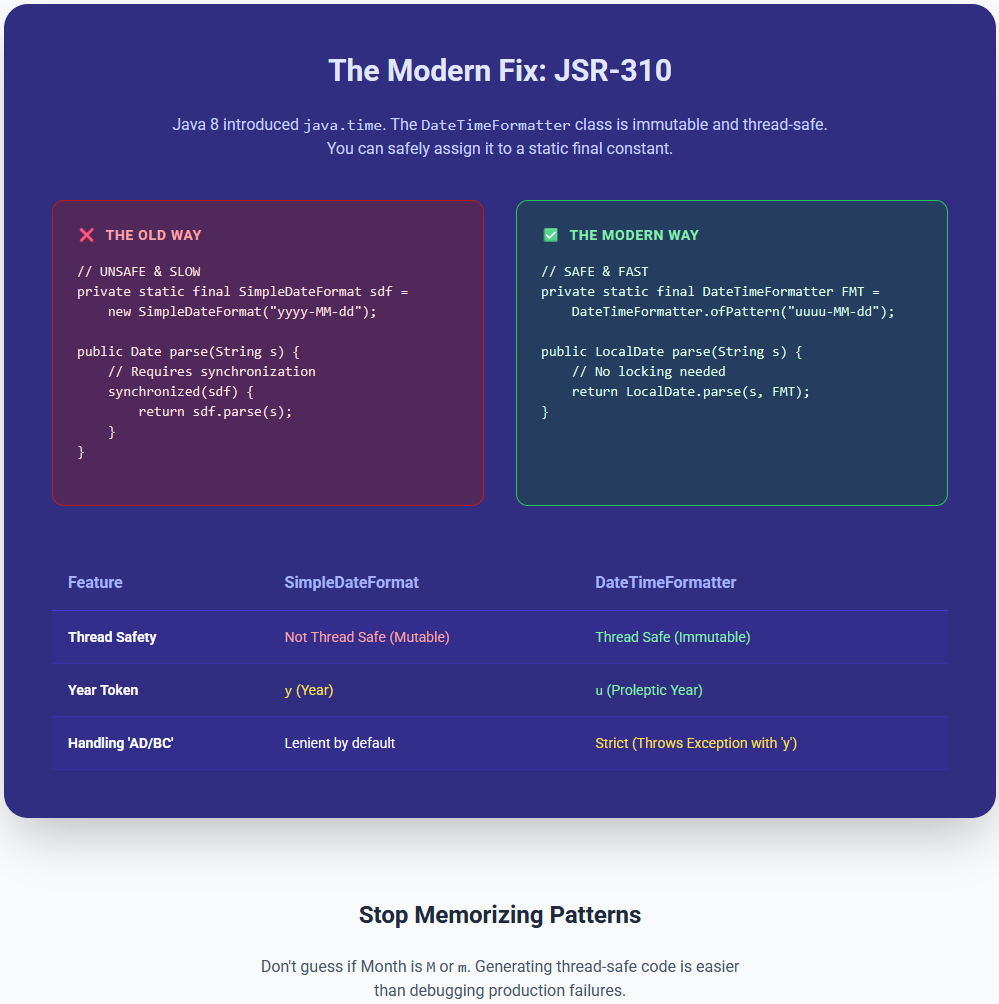
Java 8 introduced the java.time package (JSR-310), led by the creator of Joda-Time. The core class, DateTimeFormatter, is immutable and thread-safe.
You can safely declare it as a static final constant:
// SAFE to use globally
private static final DateTimeFormatter FORMTTER = DateTimeFormatter.ofPattern("yyyy-MM-dd");

public LocalDate parse(String dateStr) {
    return LocalDate.parse(dateStr, FORMTTER);
}
This is faster, safer, and cleaner. However, migrating isn’t just a “Find and Replace” job. The pattern syntax changed in subtle ways that can break your app if you aren’t careful.

Critical Warning: The u vs y Trap
This is where most senior developers get tripped up. In SimpleDateFormat, y represents the “Year”. In DateTimeFormatter, y represents “Year of Era” (e.g., 2023 AD).
For positive years (0001 to 9999), they behave mostly the same. But DateTimeFormatter is much stricter.
The “Strict Mode” Exception
If you use yyyy with a ResolverStyle.STRICT formatter, Java expects you to also provide the Era (AD/BC). Since your date string likely doesn’t have “AD” in it, it might throw an exception or behave strictly regarding the calendar system.
The Fix: Use u (Year) instead of y (Year of Era) for purely numeric years.
// The "Correct" Modern Pattern
DateTimeFormatter formatter = DateTimeFormatter.ofPattern("uuuu-MM-dd");
The YYYY (Week Year) Disaster
Another classic mistake that persists from the old API:
yyyy: Calendar Year (2023)YYYY: Week Year (Used for financial weeks)
If you use YYYY and the date is December 31st, 2023 (which might fall into the first week of 2024), your code will print 2024-12-31. You just time-traveled a year into the future.
Stop Memorizing Patterns
Let’s be honest: Do you remember if “Month” is M or m? (It’s M—m is minute). Do you remember if “Timezone Offset” is Z, X, or x?
Getting these patterns wrong leads to production bugs that are hard to reproduce locally.
Instead of guessing or digging through Oracle’s 10,000-word documentation, use our generator.
Try the Online Date Parser Generator Tool which will get rid of most of the issue in writing up the code.
- Paste your date string: (e.g.,
2023-10-05T14:30:00.000Z) - Select your Language: Java (DateTimeFormatter)
- Get the Code: We generate the exact, thread-safe
DateTimeFormatterpattern for you, ensuring you useuvsycorrectly and handle timezones properly.
Summary Checklist for Java Dates:
- ✅ DELETE all
static SimpleDateFormatinstances. - ✅ USE
java.time.LocalDateandDateTimeFormatter. - ✅ PREFER
uuuuoveryyyyfor years. - ✅ NEVER use
YYYYunless you are writing accounting software.
Frequently Asked Questions (FAQ)
Q: Is SimpleDateFormat thread-safe in Java? A: No, SimpleDateFormat is not thread-safe. It uses an internal Calendar object to store state during parsing. If multiple threads access the same instance simultaneously, the internal state can be corrupted, leading to incorrect dates or exceptions like NumberFormatException.
Q: What is the replacement for SimpleDateFormat in Java 8? A: The recommended replacement is java.time.format.DateTimeFormatter. It is immutable and thread-safe, making it suitable for use as a static constant in multi-threaded applications.
Q: What is the difference between yyyy and uuuu in date patterns? A: In DateTimeFormatter, yyyy represents the “Year of Era” (which requires an era like AD/BC in strict mode), while uuuu represents the proleptic year (signed year). For most modern applications, uuuu is the safer choice to avoid exceptions.
Q: Why does my Java date parser return the wrong year at the end of December? A: You are likely using YYYY (Week Year) instead of yyyy (Calendar Year). If Dec 31st falls in the first week of the next year, YYYY will display the new year (e.g., 2025-12-31 instead of 2024-12-31).
Happy Coding, and may your logs stay exception-free!

Sam is a Full-Stack Software Engineer and Cloud Architect. With deep expertise spanning Java, Python, React, and DevOps, he built Toolshref.com to provide developers with lightning-fast, privacy-first tools. Sam specializes in translating complex server-side logic and intricate frontend architectures into zero-fluff, highly actionable guides for modern developers.