
Python strptime & strftime Cheat Sheet
I think It happens to every Python developer at least once a week.
You are parsing a CSV file. The date column looks like Dec 05, 2023. You type out datetime.strptime(date_str, "%Y-%m-%d") and hit run.
CRASH.
ValueError: time data 'Dec 05, 2023' does not match format '%Y-%m-%d'
You stare at the screen. “Is December %b or %B? Is the day %d or %D?”
Instead of guessing and re-running your script ten times, bookmark this guide. We have compiled the complete, definitive cheat sheet for Python’s date formatting directives, plus the common pitfalls that even senior data scientists forget.
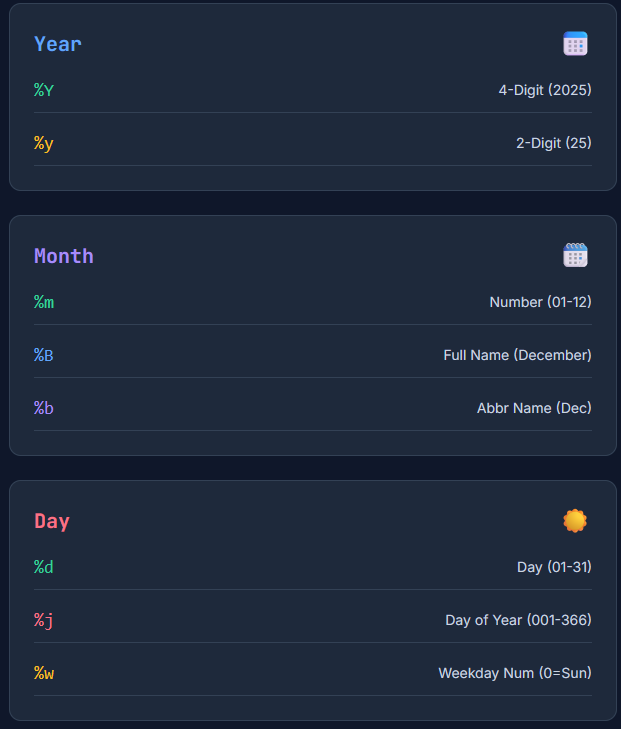
The “Mega-Table” of Directives
Use this table to build your format strings.
| Directive | Meaning | Example Output |
|---|---|---|
| Year | ||
%Y | Year with century | 2025 |
%y | Year without century (zero-padded) | 25 |
| Month | ||
%m | Month as a decimal number (01-12) | 12 |
%B | Month name (Full) | December |
%b | Month name (Abbreviated) | Dec |
| Day | ||
%d | Day of the month (zero-padded) | 07 |
%j | Day of the year (001-366) | 341 |
| Weekday | ||
%A | Weekday name (Full) | Sunday |
%a | Weekday name (Abbreviated) | Sun |
%w | Weekday as a decimal number (0=Sunday) | 0 |
| Time | ||
%H | Hour (24-hour clock) | 14 |
%I | Hour (12-hour clock) | 02 |
%p | AM or PM | PM |
%M | Minute | 30 |
%S | Second | 05 |
%f | Microsecond (zero-padded) | 000000 |
| Timezone | ||
%z | UTC offset | +0530 |
%Z | Time zone name | IST |
strptime vs strftime: What’s the Difference?
The codes are the same, but the direction is different.
strptime(String Parse Time): Converts a String ⮕ Datetime Object.- Use case: Reading data from logs, CSVs, or user input.
dt = datetime.strptime("2025-12-07", "%Y-%m-%d")
strftime(String Format Time): Converts a Datetime Object ⮕ String.- Use case: Printing dates for reports or filenames.
s = dt.strftime("%B %d, %Y")# “December 07, 2025”
3 Common Pitfalls That Break Your Code
1. The “Zero Padding” Trap
Python’s strptime is strict. If you use %d (zero-padded day), it expects 07. If your input string is 7 (single digit), it might fail on some platforms or implementations.
- Fix: Ensure your data is cleaned, or use a custom parser if inputs vary between
7and07.
2. The “Locale” Nightmare
If your server is set to en_US, parsing 05/12/2025 usually means May 12th. If your server is set to fr_FR or en_GB, parsing 05/12/2025 means December 5th.
If you use %b (Month name), it depends on the system locale!
%bparses “Dec” in English.%bfails to parse “Dec” in French (it expects “déc.”).
Pro Tip: Always set the locale explicitly in your Docker containers or environment if you rely on month names.
3. Case Sensitivity
%m is Month. %M is Minute. %y is Year (2 digits). %Y is Year (4 digits). Mixing these up is the #1 cause of logic bugs where your code runs but produces nonsense data (e.g., your “minutes” become your “month”).
Stop Memorizing the Table
Why waste brain power memorizing %p vs %P?
We built a tool that does the mapping for you. You just paste the date you have, and we generate the Python code.
Try the Python Date Parser Generator
- Paste your weird date:
Sunday, Dec 7th '25 at 2:00 PM - Select Python: We support
datetimeandpandas. - Copy the Code: We give you the exact string:
"%A, %b %dS '%y at %I:%M %p"
It handles the tricky stuff (like punctuation and spacing) automatically.
Frequently Asked Questions (FAQ)
Q: How do I handle “st”, “nd”, “rd”, “th” in dates (e.g., Dec 7th)? A: Python’s standard strptime does not support ordinal suffixes natively. You cannot use %dth. You must either preprocess the string to remove the suffix or use a third-party library like dateutil.
Q: What is the difference between %y and %Y? A: %Y is for a 4-digit year (2025). %y is for a 2-digit year (25). Be careful with %y—Python has to guess the century (1900s vs 2000s) based on platform rules, which can be risky for historical data.
Q: Why do I get ValueError: time data does not match format? A: This means your format string doesn’t exactly match the input. Look for missing spaces, incorrect separators (using - instead of /), or case-sensitivity errors (%m vs %M).
Q: Can I use this for Pandas? A: Yes! The format codes for pandas.to_datetime(format=...) are exactly the same as the standard Python library.
Bookmark this page (or just use our Generator Tool) and never get a ValueError again.

Sam is a Full-Stack Software Engineer and Cloud Architect. With deep expertise spanning Java, Python, React, and DevOps, he built Toolshref.com to provide developers with lightning-fast, privacy-first tools. Sam specializes in translating complex server-side logic and intricate frontend architectures into zero-fluff, highly actionable guides for modern developers.