
Paste your Java code below and format it with proper indentation
Java Formatter Pro
Format, Minify & Configurable StylesWhat is Java Code Formatter and WHY we need it ?
How to Use the Java Code Formatter Pro
Formatting legacy Java code or cleaning up a quick snippet shouldn’t be a headache. Our Java Formatter Pro is designed to take your raw, messy code and turn it into a clean, readable standard format instantly—all within your browser.
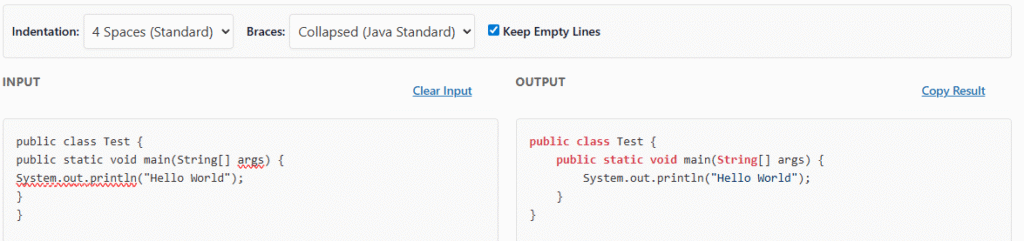
Step 1: Input Your Code
Start by pasting your Java code into the INPUT box on the left. Whether it is a single class file or a messy block of logic you copied from a forum, just drop it in. If you want to test the tool first, the editor comes pre-loaded with a “Hello World” example.
Step 2: Configure Your Style
Before you hit format, you can customize how the code should look using the settings bar above the editor:
- Indentation: Choose 4 Spaces (Standard), 2 Spaces (Compact), or Tabs depending on your project’s style guide.
- Braces: Select Collapsed (Java Standard) to keep opening braces on the same line, or Expanded to force them onto a new line (C# style).
- Keep Empty Lines: Leave this checked if you want to preserve the vertical spacing in your original code. Uncheck it to strip out all extra whitespace for a denser look.
Step 3: Format or Minify
Once your settings are chosen, click the blue ⚡ Format button. Your code will instantly appear in the OUTPUT box on the right, fully indented and syntax-highlighted.
Need to save space? Click the gray 📦 Minify button instead. This removes all comments, newlines, and extra spaces, creating a compact version of your code perfect for transmission or storage.
Format Java Code Instantly – Free Online Code Formatter Tool
Let me guess what happened. You just copied some Java code from Stack Overflow, or maybe you merged changes from three different developers, and now your file looks like a complete disaster. The indentation is all over the place. Some lines have eight spaces, others have tabs, and a few brave souls decided four spaces was the way to go.
You know you should fix it. But the thought of going through hundreds of lines manually, adding spaces here, removing tabs there, organizing those curly braces… honestly, you’d rather just move on to actually solving the problem you were working on.
I get it. I’ve been there more times than I want to admit.
The Real Cost of Messy Code
Here’s something most developers don’t think about: messy formatting isn’t just ugly. It actually costs you time and money. check how Spaghetti Code impacts.
When you’re debugging at 2 AM trying to figure out why your method isn’t working, inconsistent indentation makes it ten times harder to see where one code block ends and another begins. You waste minutes (sometimes hours) just trying to visually parse the structure of your own code.
Code reviews turn into formatting debates instead of discussions about actual logic. Your teammate leaves a comment: “Can you fix the indentation here?” Now you’re having conversations about spaces versus tabs instead of whether your algorithm is efficient.
And if you’re a student? Professors absolutely notice messy code. I’ve seen perfectly functional assignments lose points simply because the formatting made them painful to read.
Why Manual Formatting Doesn’t Work
Sure, you could format your code manually. Hit the spacebar a bunch of times, line everything up, make sure all your curly braces are where they should be.
But here’s the problem: it takes forever. And it’s boring. Really, really boring.
Plus, you’ll make mistakes. You’ll miss a line. You’ll indent something four spaces when everything else is using three. You’ll spend so much time on formatting that you forget what you were actually trying to accomplish with your code.
Your IDE has auto-format, right? Yeah, but it only works for the file you have open. If you’ve got fifteen Java files that all need formatting, you’re clicking through each one individually. And if you want to format code snippets you find online before pasting them into your project? Your IDE can’t help with that.
What Makes Code “Well-Formatted” Anyway?
Before we talk about solutions, let’s be clear about what good Java formatting actually looks like.
Consistent Indentation: Every nested block should be indented the same amount. If you’re using spaces, stick with spaces everywhere. If you’re using tabs… well, most Java developers use spaces, but the point is consistency.
Proper Brace Placement: Whether you put opening braces on the same line or the next line, do it the same way throughout your code. The Java community generally prefers the same-line style, but consistency matters more than the specific choice.
Readable Line Length: Lines that stretch 200 characters across your screen are hard to read. Good formatting keeps lines at a reasonable length, usually 80-120 characters.
Logical Spacing: Blank lines between methods, spaces around operators, consistent spacing in parameter lists. These small details make code scannable at a glance.
Aligned Elements: When you have multiple similar lines (like variable declarations or case statements), aligning them makes patterns obvious and mistakes easier to spot.
Enter: The Java Code Formatter
This is where a good code formatter changes everything.
Imagine taking that mess of code—the one with random indentation, misaligned braces, and no consistent spacing—and transforming it into clean, professional-looking Java code in literally two seconds.
No manual work. No tedious spacing adjustments. No arguments with your team about where braces should go. Just clean, consistent, readable code that follows industry standards.
That’s what a proper Java code formatter does. You paste in your messy code, click a button, and get back properly formatted Java that looks like it was written by someone who actually cares about code quality.
Real Situations Where This Saves Your Day
You’re Learning Java: You’re following a tutorial, copying code examples, trying to understand how things work. But the examples you find online all have different formatting styles. Some are cramped with no spaces, others are spread out weirdly. You want to focus on learning the language, not fighting with formatting.
Group Projects in College: Your team of four people all has different coding styles. When you merge your code together, it’s a formatting nightmare. Instead of manually fixing everyone’s inconsistent styles, run it through a formatter once and move on.
Job Interviews: You’re doing a coding challenge or technical interview. You need to write Java code quickly, but you also want it to look professional. A formatter lets you focus on solving the problem, knowing you can clean up the formatting in seconds before submitting.
Stack Overflow Code: You found the perfect solution to your problem on Stack Overflow. But the person who posted it apparently hates proper indentation. Before adding it to your codebase, you need it formatted consistently with the rest of your project.
Legacy Code Maintenance: You inherited a Java project from a developer who left the company two years ago. The code works, but the formatting is inconsistent and hard to read. You need to make changes, but first you need to understand what’s there.
What to Look for in a Formatter
Not all code formatters are created equal. Here’s what actually matters:
Speed: You should be able to format code instantly. If you’re waiting more than a second or two, the tool is too slow.
Accuracy: The formatter should preserve your code’s logic perfectly. It should only change whitespace and formatting, never the actual functionality.
Standards Compliance: Good formatters follow established Java style guides like Google’s Java Style Guide or Oracle’s Code Conventions. This means your formatted code will look familiar to other Java developers.
Ease of Use: You shouldn’t need to configure 47 different settings or read a manual. Paste code, get formatted code back. That’s it.
No Installation Needed: The best tools run in your browser. No downloads, no setup, no compatibility issues. Just open and use.
The Bottom Line
Formatting Java code manually is a waste of your time. You’ve got better things to do—like actually writing features, fixing bugs, or learning new concepts.
A good code formatter isn’t just about making your code look pretty (though that’s nice). It’s about removing a tedious, error-prone task from your workflow so you can focus on what actually matters.
Your code is going to be read more times than it’s written. By other developers. By code reviewers. By future-you trying to remember what you were thinking six months ago. Making that code clean and readable isn’t optional—it’s part of being a professional developer.
Stop wasting time manually adjusting indentation. Stop having formatting arguments with your teammates. Stop losing points on assignments because your code looked messy.
Format your code properly, and move on to the interesting problems. if you’re a junior dev check this checklist to help ypu improve over the time.
FAQ java code formatter
Frequently Asked Questions (FAQ)
1. How does the Java Code Formatter work?
This tool takes raw, unformatted Java code—often referred to as “spaghetti code”—and automatically restructures it. It applies standard indentation rules, fixes spacing around brackets and operators, and ensures your code follows a clean, readable structure (typically following Oracle or Google Java Style guidelines).
2. Is my Java code safe? Does it get saved?
Your privacy is our top priority. This formatter runs 100% client-side in your browser. This means your proprietary code snippets, logic, and algorithms are processed locally on your device and are never sent to our servers. You can safely format sensitive or corporate code without worrying about data leaks.
3. Why should I use an online formatter instead of my IDE?
While IDEs like IntelliJ or Eclipse are powerful, they take time to load and index projects. Toolshref is designed for speed. It is perfect for quick tasks: cleaning up a snippet you found on Stack Overflow, formatting code for a blog post, or quickly checking readability before sending a code review snippet, all without opening a heavy application.
4. Does this tool fix syntax errors in my code?
No, this is a formatter, not a compiler. Its primary job is to fix the visual layout (whitespace, indentation, line breaks) of your code to make it human-readable. If your code has syntax errors (like missing semicolons), the formatter will still try to indent it, but it will not “fix” the broken logic. For bug detection, please check our Java Static Code Analyzer.
5. Will this change the logic of my program?
Absolutely not. The formatter only modifies “whitespace”—spaces, tabs, and line breaks. It never changes variable names, logic flow, or operational commands. Your code will function exactly the same way; it will just look much cleaner.
6. Does it support modern Java versions (Java 17, 21+)?
Yes. The parser supports standard Java syntax, including modern features like Records, Switch Expressions, and Text Blocks introduced in newer Java versions.
7. Can I use this for other languages like C++ or C#?
This tool is specifically optimized for Java. While C-style languages (like C++ and C#) share similar syntax and might partially look better after running through this tool, we recommend using it strictly for Java files to ensure the indentation logic is perfectly applied.