
- Spring Boot 3: Ensure you use
.httpBasic(Customizer.withDefaults())in your SecurityFilterChain. - Database: Passwords must be encoded (BCrypt) or prefixed with
{noop}for plain text. - The Fix: 90% of 401s are due to bad Base64 encoding. Check your header string here.
There is nothing more frustrating in backend development than the “Silent 401.”
You have written your unit tests. You have configured your SecurityFilterChain. You have created your user in the database. Yet, when you try to hit your API from Postman or a frontend client, the server instantly rejects you with 401 Unauthorized.
No stack trace. No error message. Just “No.”
If you are migrating to Spring Boot 3 and Spring Security 6, this has become even more common because the old configuration methods (like WebSecurityConfigurerAdapter) have been completely removed. What used to work in 2022 might now be the reason your API is broken.
In this comprehensive guide, we are going to dissect the 401 error. We will look at the raw HTTP headers, fix the common Base64 encoding mistakes that trip up 90% of developers, and provide the correct, modern configuration for Spring Security.
1. The Anatomy of a Basic Auth Request
To fix the error, you first need to understand what Spring Security is actually looking for. It does not read your “Password” field from a JSON body. It looks exclusively at the HTTP Headers.
When you send a request using Basic Authentication, your client (Browser, Postman, or `curl`) constructs a specific header key called Authorization.
The “Handshake” Process:
- Input: You provide the username
adminand passwordsecurePassword123. - Concatenation: The client joins them with a colon:
admin:securePassword123. - Encoding: This specific string is encoded into Base64.
- Transport: The client sends the header:
Authorization: Basic YWRtaW46c2VjdXJlUGFzc3dvcmQxMjM=.
Spring Security’s BasicAuthenticationFilter intercepts this request. It strips the “Basic ” prefix, decodes the Base64 string back into text, splits it at the colon, and then attempts to authenticate the user.
The Problem: If even one character in that Base64 string is wrong (due to a bad copy-paste, a hidden space, or a character encoding issue), Spring sees a garbage password. It doesn’t tell you “Wrong Password”—it just returns 401.
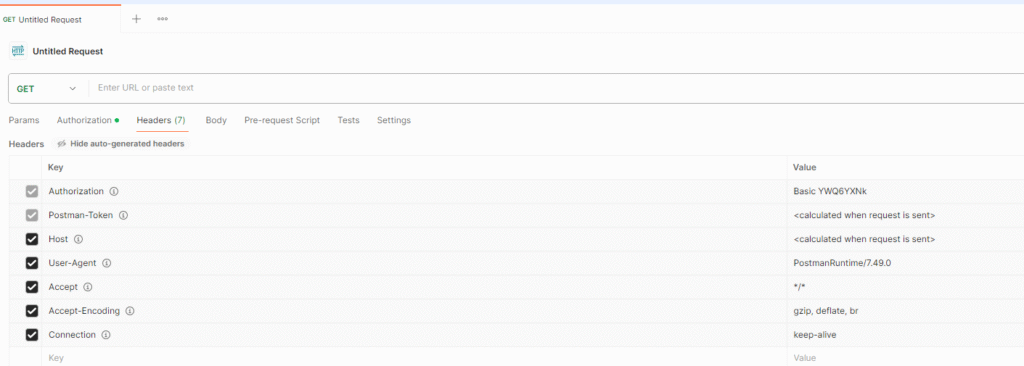
2. The “Invisible” Cause: Base64 Encoding Errors
Before you tear apart your Java config, you must verify that the client is sending what you think it is sending. This is the #1 cause of lost hours in debugging.
Common scenarios where encoding fails:
- The “Newline” Bug: If you generate headers via a Linux terminal (
echo "u:p" | base64), it often adds a hidden newline character (\n) at the end. Spring treats this as part of the password. - Special Characters: If your password contains symbols like
$,&, or non-ASCII characters, generic online encoders often corrupt them by using the wrong charset (Latin1 vs UTF-8). - Postman Caching: Sometimes Postman holds onto an old “Auth” tab setting even after you change the headers manually.
How to Debug This Instantly
Don’t guess. Decode the header yourself.
🛠️ The “Sanity Check” Workflow
1. Copy the value of your Authorization header (the random string after “Basic “).
2. Paste it into our Secure Base64 Decoder Tool.
3. Look closely at the result. Does it have a trailing space? Is the colon in the right spot? Does the password match your database exactly?
(Note: Our tool runs locally in your browser, so you aren’t sending your credentials to a third-party server log.)
3. The Solution: Correct Spring Security 6 Configuration
If your header is correct but you are still getting 401s, the issue is likely your SecurityFilterChain. In Spring Boot 3, the syntax is strict.
Here is the Gold Standard configuration for a REST API using Basic Auth:
package com.example.demo.config;

import org.springframework.context.annotation.Bean;
import org.springframework.context.annotation.Configuration;
import org.springframework.security.config.Customizer;
import org.springframework.security.config.annotation.web.builders.HttpSecurity;
import org.springframework.security.config.annotation.web.configuration.EnableWebSecurity;
import org.springframework.security.web.SecurityFilterChain;

@Configuration
@EnableWebSecurity
public class SecurityConfig {

    @Bean
    public SecurityFilterChain filterChain(HttpSecurity http) throws Exception {
        http
            // 1. Disable CSRF for Stateless APIs
            // If you leave this enabled, POST/PUT requests will fail with 401/403
            .csrf(csrf -> csrf.disable())

            // 2. Define Authorization Rules
            .authorizeHttpRequests(auth -> auth
                .requestMatchers("/public/**", "/actuator/health").permitAll() // Open endpoints
                .requestMatchers("/admin/**").hasRole("ADMIN") // Role-based endpoints
                .anyRequest().authenticated() // Everything else requires login
            )

            // 3. Enable Basic Auth (The New Syntax)
            // This installs the BasicAuthenticationFilter
            .httpBasic(Customizer.withDefaults());

        return http.build();
    }
}
Quick Reference: Valid vs. Invalid Headers
| Header Format | Status | Why it Fails |
|---|---|---|
Authorization: Basic YWRtaW46... | ✅ Valid | Correct prefix and encoding. |
Authorization: YWRtaW46... | ❌ Invalid | Missing “Basic ” prefix. |
Basic YWRtaW46... | ❌ Invalid | Header Key must be “Authorization”. |
Key Changes in Spring Boot 3:
- Functional Style: Methods like
.csrf()and.httpBasic()now take a Lambda (functional interface) orCustomizer.withDefaults(). The old.csrf().disable()chaining style is deprecated. - Request Matchers: Use
requestMatchers()instead of the oldantMatchers().
4. The “Silent Killer”: Database Password Encoding
If you connect your application to a database (MySQL/PostgreSQL), Spring Security expects the passwords in your database to be encoded.
If your database table has a user with the password password123 stored in plain text, authentication will fail.
Why? Because the default PasswordEncoder (BCrypt) tries to match the hash of the input password against the database value. It cannot match a hash against plain text.
The Fix:
- For Production: Store passwords as BCrypt hashes (starting with
$2a$10$...). - For Local Testing (Quick Fix): You can tell Spring to allow plain text by prefixing the password with
{noop}.
// Example of an In-Memory User for Debugging
@Bean
public UserDetailsService users() {
    UserDetails user = User.builder()
        .username("user")
        .password("{noop}password123") // {noop} is crucial for plain text!
        .roles("USER")
        .build();
    return new InMemoryUserDetailsManager(user);
}
5. Advanced Debugging: Enable Security Logs
When all else fails, you need to see exactly why the AuthenticationManager is saying no. Spring Security logs are hidden by default, but you can turn them on.
Add this to your application.properties:
logging.level.org.springframework.security=DEBUGWhat to look for in the logs:
Failed to authenticate since password does not match stored value→ Your encoding is wrong (Base64 issue or BCrypt issue).Pre-authenticated entry point called. Rejecting access→ The header isn’t being parsed correctly.CSRF token not found→ You forgot to disable CSRF for your POST request.
Frequently Asked Questions (FAQ)
Why do I get 401 for POST requests but 200 for GET requests?
This is almost always due to CSRF (Cross-Site Request Forgery) protection. By default, Spring Security enables CSRF, which blocks any state-changing request (POST, PUT, DELETE) that doesn’t include a valid CSRF token. For REST APIs, you should generally disable this using .csrf(csrf -> csrf.disable()).
What is the difference between 401 and 403?
This is a vital distinction for debugging. 401 Unauthorized means “I don’t know who you are” (Authentication failed). 403 Forbidden means “I know who you are, but you aren’t allowed here” (Authorization failed). If you get a 403, your password is correct, but your Roles/Authorities are wrong.
Can I use Basic Auth for a React/Angular frontend?
Technically yes, but it is not recommended. Basic Auth does not have a “Logout” feature (the browser caches the credentials forever until you close it). For modern frontends, you should use JWT (JSON Web Tokens) or Session-based auth.
How do I test Basic Auth in curl?
You can use the -u flag: curl -u admin:password http://localhost:8080/api.
However, once you have a working curl command, manually translating it into Java `HttpClient` or `RestAssured` code is tedious. To save time, you can paste your working command into our Curl to Java Converter to generate the exact Spring Boot or Java 11+ request code instantly.

Sam is a Full-Stack Software Engineer and Cloud Architect. With deep expertise spanning Java, Python, React, and DevOps, he built Toolshref.com to provide developers with lightning-fast, privacy-first tools. Sam specializes in translating complex server-side logic and intricate frontend architectures into zero-fluff, highly actionable guides for modern developers.